

A region can look production-ready at 1G and start falling apart at 10G.
That’s why your regional POC should show whether bandwidth, compute, IP controls, platform stability, and pricing hold up as real traffic scales.
It should answer four questions:
- Can bandwidth scale to your required volume and remain stable?
- Are the instances reliable over weeks, not just during a short test?
- Do bring your own IP (BYOIP) and bring your own autonomous system number (BYOASN) work operationally, not just on paper?
- Can routine infrastructure changes be completed through the API without relying on support tickets or manual intervention?
This is the second part of our three-part series on evaluating infrastructure for access-heavy platforms. Check out Part 1 and Part 3.
Price the region before you test it
For access-heavy platforms like VPN, proxy, scraping, or crawling, bandwidth is usually your largest cost, so it’s worth pricing out before you stage the POC.
Start with the rate and commitment model. See if bandwidth can be aggregated across instances or needs separate commitments, how overages are handled, and whether larger deployments support 95th-percentile billing.
Find out exactly how billable traffic is calculated. Make sure you know where bandwidth is measured, which traffic directions are included, what traffic is excluded from billing, and whether traffic passing through multiple provider-managed services can be counted more than once.
Check if your quoted pricing depends on a particular deployment configuration, including how bandwidth is pooled, traffic is routed, or IP and network resources are assigned.
For compute, elasticity is just as important as pricing. See if instances are truly pay-as-you-go and if you can easily scale them up or down as demand changes. Cloud compute offers this flexibility in a way fixed bare-metal deployments generally don’t.
Finally, make sure the agreed rates and billing methodology match the provider’s usage reporting and final invoice, as well as what appears in their console if one is available.
Define your production target
Before directing traffic into the region, map out what the deployment will need to support in production.
Start with where your users or target sites are, how much bandwidth and how many instances you may need, whether traffic is steady/bursty/project-based, and which IP resources and routing controls the workload depends on.
If you expect to scale bandwidth from 1G to 100G, you need a different test than you would for a smaller regional workload. The same applies if you’re going from 10 instances to 500.
Setting the target first is key to ensuring your POC measures whether the region can support your expected scale in production.
Ramp real production traffic in stages
Testing an instance in isolation won’t really tell you how the full environment will handle your actual traffic.
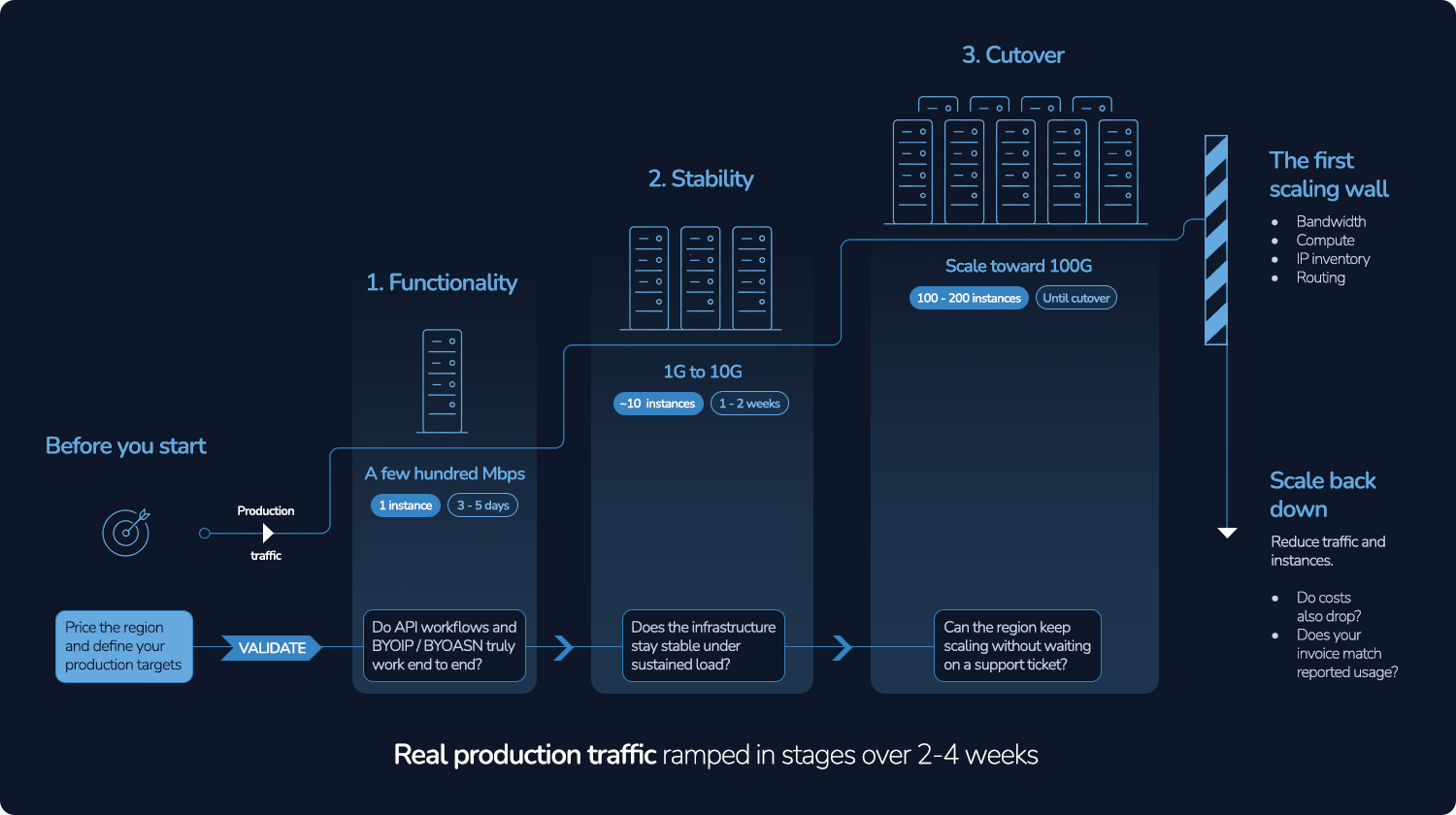
It’s critical to first move a small portion of your actual production traffic into the region and increase it in stages. Run the complete test for two to four weeks so you can observe sustained performance, maintenance events, and behavior at higher scale.
Stage 1 – functionality
Start with a few hundred Mbps on one instance for three to five days. Verify the basic operating environment:
- Instance deployment and usability
- IP assignment and management
- BYOIP and BYOASN behavior
- Routing and monitoring data
- Console visibility
- Pricing and usage reporting
Don’t accept “supported” as a complete answer for BYOIP or BYOASN. Check what that support actually includes. For example, can you announce and withdraw prefixes through the console/API or would you need a support ticket? How quickly do announced routes take effect, and can you verify that they have propagated beyond the provider’s network?
A prefix may show as announced on the provider side without appearing in the global BGP paths your traffic depends on, causing reachability issues in the markets you’re testing.
And don’t stop at checking whether an API exists. Test whether routine actions can actually be completed end to end without a support ticket or manual steps. If the API can create instances but not tear them down, or IP/prefix changes still need a ticket, your automation will be limited by the provider’s support queue.
Stage 2 – stability
Increase traffic from roughly 1G to 10G across about 10 instances and run it for one to two weeks. Check whether bandwidth and compute performance stay stable under sustained load. Watch throughput, latency, packet loss, instance interruptions, unexpected reboots, and routing changes.
Sustained load can also surface problems that shorter tests miss, so if an instance starts slowing down, make sure you have enough visibility from the provider to tell whether the problem is your workload or other activity on the infrastructure it shares.
For VPN and proxy, look for unstable sessions, lower connection success, or inconsistent access. For crawling and scraping, pay attention to rising retries, timeouts, longer completion times, and lower throughput consistency.
Stage 3 – production cutover
Start ramping traffic up toward the production volume you’re expecting the region to carry.
For high-volume deployments, scale toward 100G and 100-200 instances while checking that bandwidth continues scaling beyond 10G and compute can be added without waiting on physical hardware, quota increases, or manual provisioning.
At this stage, also check how much visibility you have into available capacity in the region. If the provider offers an API, see whether you can query that capacity programmatically instead of finding out what’s available only when a provisioning request fails.
This is also where provider controls that never showed up at low traffic can surface issues. High connection counts, large amounts of UDP traffic, or unusual access patterns may trigger false-positive blocking by automated abuse systems. Be sure to watch for increased attack exposure as traffic approaches production scale.
Connect workload symptoms to infrastructure behavior
When performance degrades, first identify whether the cause sits with compute, bandwidth, routing, storage, your application, or the destination itself.
Monitor CPU and memory utilization, network throughput, bandwidth consumption, packet loss, latency, and storage performance where relevant, then connect those infrastructure metrics to your workload.
For VPN and proxy platforms, compare those metrics with session stability, connection success, sustained throughput, and access consistency. For crawling and scraping platforms, compare them with retry rates, timeouts, completion time, throughput consistency, and data completeness.
If completion times start rising as network utilization climbs, for example, bandwidth may be the problem. If there’s still bandwidth available but instances start slowing down, look at compute or application configuration. And if performance only changes across certain destinations, check the routing path or the destination itself.
Find your first scaling wall
Your staged ramp should show which resource hits its limit first. Most often, that comes down to either bandwidth no longer scaling cleanly as traffic grows or compute not expanding fast enough to keep up with the workload.
Which bottleneck surfaces first will depend on the market, from bandwidth and IP inventory to routing consistency and available compute.
This is the kind of scaling gap we built Zenlayer Elastic Compute (ZEC) to close. It provides regional virtual machines with near-bare-metal performance, integrated networking, and access to our global private backbone, along with VPCs, routing, elastic IPs, NAT, load balancing, and cross-region connectivity within the same broader environment.
ZEC lets you test your workload alongside the network paths, IP resources, and routing design it will use as the deployment grows so you can see where your first scaling wall actually shows up.
Test stability and failure handling
Run the POC long enough to encounter maintenance events and infrastructure changes. Track how often instances are interrupted and whether your provider keeps your workload running when a host needs service.
A cloud compute platform gives you more flexibility when infrastructure fails or needs maintenance.
With ZEC, capabilities like VM auto-failover and memory fault isolation help keep workloads running if the underlying infrastructure encounters an issue, while DDoS protection adds another layer of resilience.
Decoupled storage also keeps data from being tied to a single physical server so moving workloads won’t require physically moving drives, which risks data loss. Elastic IPs make it easier to redirect traffic without rebuilding the surrounding environment.
Test whether costs scale back down
Elasticity should work in both directions. After your production ramp, move traffic away from the test region and lower your instance count, then see if bandwidth and compute costs start coming down.
Review the invoice once your test reaches higher volume and make sure each charge traces back to the agreed bandwidth commitment and compute usage, with the totals matching what the console reports.
Small discrepancies during initial tests can quickly snowball into sticker shock once you start scaling toward 100G+.
Turn the POC into a decision
Testing with real traffic should leave little separation between your POC and the production deployment. The same IP resources, routing, monitoring, and operating model should remain in place as capacity grows.
The next step is determining whether the provider can deliver the same capacity, network control, support, and operational consistency across the other regions you may need.
In the next blog, we’ll look at how to evaluate a regional infrastructure provider before committing to production.